How to follow up on WhatsApp without forgetting anyone
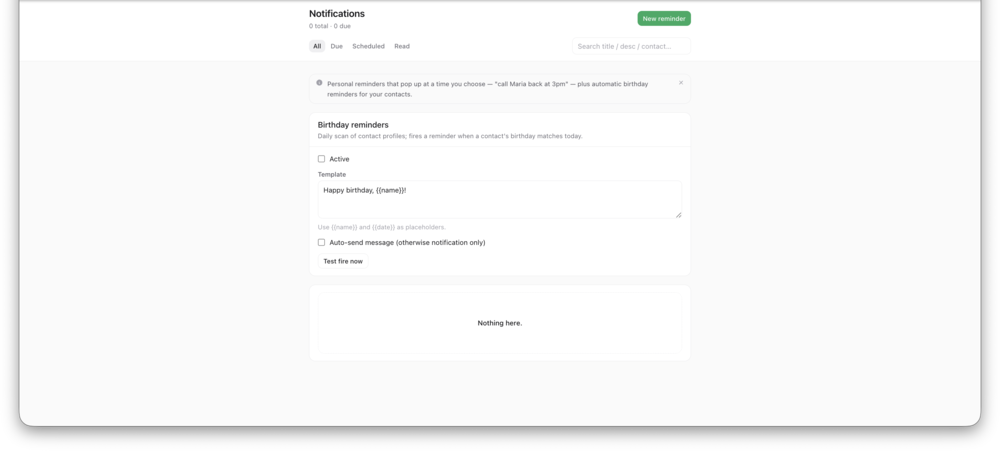
Put the reminder on the chat, not in your head. WhatsApp sorts chats by the newest message and never tells you to write back, so a promise like "I'll reply Thursday" sinks down the list. The free fix is to mark the chat as unread and add it to a list you check each morning. The faster fix is a reminder on the chat: you pick the day and time, your computer shows an alert, and you write the message yourself.
A reminder is a note to yourself. It does not message the customer.
InboxCRM also has follow-up rules that message a contact after a set number of days in a stage. WhatsApp's terms restrict automated messaging, so read the responsible automation page before you use them.
InboxCRM runs in desktop Chrome on WhatsApp Web. It does not work in the WhatsApp mobile app.
InboxCRM is an independent product and is not affiliated with, authorized by, endorsed by, or sponsored by WhatsApp or Meta Platforms, Inc. WhatsApp is a trademark of Meta Platforms, Inc.
Common questions
Does the customer get anything when I set a reminder?
+
No. A reminder is a note-to-self on a chat. It shows a desktop notification at the time you choose and sends nothing to the customer.
Can WhatsApp itself remind me to reply?
+
Not for a single chat. You can mark a chat as unread, pin up to three chats and group chats into lists, but none of these alert you at a time you set.
How soon should I follow up?
+
It depends on the sale. A common rhythm is a light check after about three days, a second one after a week, and a polite offer to close the enquiry after two weeks.