
Skip to content

The short answer

How to track WhatsApp leads without a spreadsheet

Give every chat a step, and keep the step next to the chat. A spreadsheet fails because you have to leave WhatsApp to update it, so it is out of date by the afternoon. With WhatsApp alone, use labels or lists named after your steps. With InboxCRM, each chat becomes a card on a board inside WhatsApp Web: you name the steps, drag the card when the customer moves, and add a price to see how much is waiting.

Not ready to install? Try pipeline board on a practice screen.

Why InboxCRM fits this

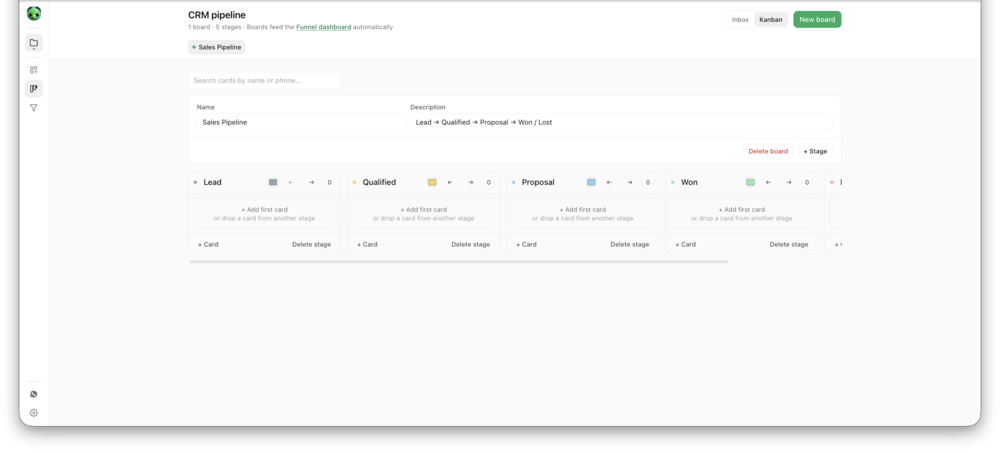
InboxCRM turns each chat into a card on a board inside WhatsApp Web, so there is no second sheet to update.

The InboxCRM pipeline board, with chats as cards in named stagesView full size
The InboxCRM pipeline board, with chats as cards in named stages.

Step by step

How to track your leads without a spreadsheet

Two ways to do it. The first needs no extra software.

With WhatsApp alone

  1. 1Write down five steps a customer goes through, for example: new, price sent, paid, delivered, lost.
  2. 2In the WhatsApp Business app, make one label per step.
  3. 3Give every customer chat exactly one label, and change it when they move.
  4. 4Once a week, open each label and count the chats.

With InboxCRM

  1. 1Open the CRM board from the InboxCRM sidebar and name your stages.
  2. 2Add a chat to the board from the chat-tools panel beside it.
  3. 3Drag the card to the next stage when the customer moves.
  4. 4Add a deal value to each card. The board then feeds the funnel report.
Add InboxCRM to Chrome

What this does not do

  • The board lives in the browser where the extension is installed. It is not shared between computers.
  • InboxCRM runs in desktop Chrome on WhatsApp Web. It does not work in the WhatsApp mobile app.

InboxCRM is an independent product and is not affiliated with, authorized by, endorsed by, or sponsored by WhatsApp or Meta Platforms, Inc. WhatsApp is a trademark of Meta Platforms, Inc.

Common questions

How many stages should I have?

Five or six. Base each one on something the customer has done, such as asked, received a price, paid. Fewer stages get updated more reliably.

Do I need the WhatsApp Business API for a pipeline?

No. InboxCRM works with the account you already use in WhatsApp Web. There is no API account and no number migration.

Where is the board stored?

In Chrome's local extension storage on your own device. InboxCRM keeps no server-side copy of your CRM records. You can export a backup file at any time.

Related how-tos

Turn your WhatsApp inbox into an organised sales workspace

Add the extension, open WhatsApp Web and start organising the chats you already have. No separate CRM to keep in sync.

  • Works with your existing WhatsApp Web account
  • CRM records stay on your device
  • AI optional, your own key